A Comprehensive Guide to WordPress Domain Registration and Management

Integrating a domain with the WordPress platform requires a clear understanding of how DNS (Domain Name System) infrastructure interacts with web hosting environments. While many users associate WordPress primarily with content management, the process of securing a digital namespace involves specific technical configurations that ensure your site remains accessible, secure, and professionally branded.

Quick Summary
WordPress domain registration involves linking a registered domain to a hosting environment to make your website accessible via a custom URL. The process ensures that your chosen namespace effectively points to your WordPress server through properly configured A and CNAME records within your DNS settings.
- Verify domain availability through a reputable registrar.
- Update name servers or DNS records to point to the host.
- Ensure SSL certificate deployment for secure connections.
- Configure WordPress site URLs in the settings dashboard.
Table of Contents
- Understanding Domain Architecture
- Steps to Register and Connect a Domain
- DNS Configuration Fundamentals
- Common Pitfalls and Troubleshooting
- FAQ
- Recommended Reads
Understanding Domain Architecture
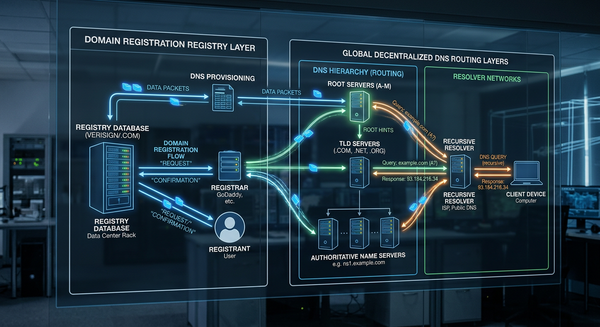
A domain name serves as the human-readable address for your website, while the underlying infrastructure acts as the digital map directing traffic. When you initiate a wordpress domain registration process, you are essentially securing a lease on a specific string of characters within a top-level domain (TLD) registry. This registry manages the authoritative database for that TLD, ensuring that each domain is globally unique.
For WordPress users, the distinction between a registrar and a web host is critical. The registrar holds the legal right to the domain name, while the host provides the server space where your files and database reside. Connecting the two requires updating the DNS records, which acts as the telephone directory for the internet, telling browsers exactly which server corresponds to your domain name.
Steps to Connect a Domain
Following a systematic approach ensures that your domain points correctly to your WordPress installation without extended downtime.
- Verify Ownership: Ensure the domain is registered in your name or your organization's control panel. Access to the registrar's dashboard is essential for managing zone files.
- Locate Nameserver Information: Identify the nameservers provided by your hosting company. These are typically in the format of ns1.yourhost.com and ns2.yourhost.com.
- Update DNS Records: Within your registrar's control panel, locate the 'Nameserver' or 'DNS Management' section. Input the host's nameservers and save the changes. Note that this process, known as propagation, can take anywhere from a few minutes to 48 hours to update globally.
- Configure WordPress Site URL: Once propagation is complete, navigate to your WordPress dashboard. Go to Settings > General and update the 'WordPress Address (URL)' and 'Site Address (URL)' to reflect your new custom domain.
- Install SSL: Security is paramount for any modern website. Ensure that you generate and install an SSL certificate through your hosting control panel to enable HTTPS encryption for your domain.
Pro Tip: Before pointing a live domain, perform a thorough check of your hosting environment to ensure that all database connections and file paths are correctly migrated or configured to match the new domain name string.
DNS Configuration Fundamentals
DNS is the backbone of register domain name with wordpress setups, relying on specific record types to route traffic. An 'A Record' maps your domain name directly to the IPv4 address of your web server. If your host provides a static IP, this is the most direct way to point your domain.
Alternatively, a 'CNAME' (Canonical Name) record is used to point a subdomain to another domain name rather than an IP address. This is frequently used for mapping 'www' to your root domain. Misconfiguring these records - such as setting an incorrect TTL (Time to Live) or pointing to an outdated IP address - can result in 404 errors or 'site not found' warnings across different global ISP networks.
Common Pitfalls and Troubleshooting
One of the most frequent issues during domain connection is propagation delay. Beginners often assume a site is broken when they see an error message immediately after saving DNS settings, when in reality, the cache of various global servers simply hasn't refreshed yet. You can use command-line tools like 'dig' or 'nslookup' to confirm if the DNS records are correctly resolving to the intended server IP.
Another common issue involves SSL mismatch. If you have updated your domain but the browser still flags the site as 'not secure,' it is usually because the SSL certificate is still tied to the previous temporary URL or has not been re-issued to cover the new custom domain. Always verify that your hosting account has re-run the auto-SSL generation task after the domain change is live.
FAQ
Does WordPress handle domain registration natively? WordPress itself is a software package. While specific service tiers or managed hosting environments may bundle domain registration, the actual registration occurs through a registrar that communicates with the TLD registry to secure the name.
What happens if my domain expires? If a domain registration expires, the DNS records are usually removed, leading to site downtime. Most registries offer a grace period, but prolonged expiration can lead to the domain being released back into the public market, resulting in potential loss of your digital asset.
Do I need to pay for a domain and hosting separately? Often, yes. While some hosts provide a domain registration as a promotional add-on, it is generally recommended to maintain control over your domain registration separately from your hosting provider to facilitate easier migrations between different infrastructure providers.
Can I use a domain I purchased elsewhere with my WordPress site? Yes. This is the standard procedure for professional websites. You simply update the nameservers or A records at your registrar to point to the server where your WordPress files are stored.