How to Perform a DNS Domain Name Lookup and Interpret Registry Data

Performing a dns domain name lookup is a fundamental skill for network administrators, developers, and domain industry stakeholders. By querying the domain name system dns, you can gain immediate insight into the underlying infrastructure, server configurations, and ownership data that govern how a domain resolves to an IP address. Whether you are troubleshooting connectivity issues or analyzing the technical foundation of a registry asset, understanding the mechanics of these queries is essential.

Quick Summary
A dns domain name lookup is the process of querying the global hierarchical database that translates human-readable domain names into machine-readable IP addresses. It enables users to verify server configurations, diagnose propagation delays, and audit domain dns records to ensure correct routing within the broader internet architecture.
- Essential for verifying DNS propagation and server health.
- Identifies root-level and authoritative name server configurations.
- Assists in identifying potential misconfigurations in mail (MX) or resource (A/AAAA) records.
- Provides transparency into the lifecycle and status of domain assets.
Table of Contents
- Understanding DNS Architecture
- How to Perform a DNS Lookup
- Interpreting Domain DNS Records
- Common Pitfalls and Troubleshooting
- FAQ
- Recommended Reads
Understanding DNS Architecture
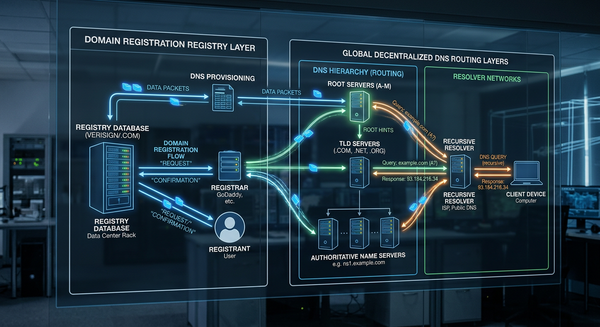
The domain name system dns acts as the phonebook of the internet. When a browser or application attempts to resolve a domain name, it initiates a recursive query process that travels through several layers. This journey begins at the recursive resolver, moves to the root name servers, proceeds to the top-level domain (TLD) servers, and finally reaches the authoritative name servers that hold the specific zone files for the requested domain.
For those involved in registry operations, understanding this hierarchy is critical because each step in the chain can introduce latency or failure points. Efficient DNS management ensures that users reach their intended destination without interruption, which is the cornerstone of maintaining a reliable namespace. If the delegation from the TLD registry to the authoritative server is misconfigured, the domain becomes effectively invisible to the public internet.
How to Perform a DNS Lookup
To conduct an accurate domain name dns check, you should rely on command-line tools that offer unfiltered access to the DNS response packets. While web-based interfaces provide convenience, CLI utilities like dig (Domain Information Groper) are the industry standard for granular analysis of domain dns records.
- Open your terminal: On macOS or Linux, use the native terminal; on Windows, use PowerShell or Command Prompt.
- Run a basic lookup: Type
dig example.comto see the default A record response. This shows the IP address currently associated with the domain. - Query specific record types: To check specific configurations, append the record type to your command. For example,
dig example.com MXallows you to inspect mail exchange settings, whiledig example.com NSreveals the authoritative name servers handling the zone. - Trace the path: Use
dig +trace example.comto view every step of the resolution process from the root (.) down to the final authoritative name server. This is invaluable when diagnosing complex propagation issues or registry-level misconfigurations.
For more advanced technical insights into how infrastructure is managed, developers often reference documentation on registry services to understand how TLD operators interact with global DNS resolvers.
Interpreting Domain DNS Records
Interpreting the output of a domain name service dns query requires an understanding of standard resource record types. The "ANSWER SECTION" of a query output provides the data you are looking for, while the "AUTHORITY" and "ADDITIONAL" sections provide supplementary information about the name servers involved in the resolution.
- A Records: These map a hostname to a 32-bit IPv4 address. If a site is down, checking for a valid A record is the first diagnostic step.
- AAAA Records: The IPv6 equivalent of A records. Ensuring these are configured correctly is vital for long-term network compatibility.
- CNAME Records: Canonical name records act as aliases, pointing one domain to another rather than to an IP address.
- TXT Records: Often used for verification purposes, such as SPF (Sender Policy Framework) or domain ownership validation, these are crucial for secure communication protocols.
Pro Tip: Always check the "TTL" (Time to Live) value returned in your query. A high TTL means changes to your DNS records will take longer to propagate globally, while a low TTL allows for near-instant updates, which is preferable during migration or emergency maintenance.
Common Pitfalls and Troubleshooting
One of the most common issues during a domain dns checker operation is DNS caching. Your local machine or ISP might be serving an outdated response, making it appear that a change has failed when, in reality, the propagation is correct. To mitigate this, always perform lookups against public DNS resolvers like 8.8.8.8 or 1.1.1.1 using the @ flag in your command (e.g., dig @8.8.8.8 example.com).
Another frequent pitfall involves "lame delegation," where the authoritative name server specified by the registry does not actually contain the zone file for the domain. This often happens if the parent zone's glue records are missing or incorrect. If you suspect an issue with your domain industry investment, verifying the delegation path using trace commands is the most effective way to pinpoint whether the problem lies with the registrar, the registry, or the hosting provider.
FAQ
Why does my domain name dns check return different results than a browser? Browsers and operating systems often cache DNS results locally. If you recently updated your DNS, your browser may still be using the old IP address from its cache, while a direct CLI lookup queries the live authoritative server.
What are glue records in a DNS lookup? Glue records are A or AAAA records provided by a TLD registry to resolve the IP address of an authoritative name server. They are necessary to prevent circular dependencies when a name server is a subdomain of the domain it is hosting.
How can I tell if a domain is experiencing DNS propagation delay? If you perform a lookup from multiple geographic locations using various public DNS servers and receive inconsistent IP addresses, propagation is still in progress across global nodes.
What is the difference between an authoritative name server and a recursive resolver? An authoritative name server holds the actual DNS records for a domain, while a recursive resolver (like the one provided by your ISP) acts as a middleman, fetching the answer from authoritative servers and caching it for subsequent requests.